Included — no charge
Ten of the fourteen work items on your list are configuration and rebuild work covered under your existing Cogent plan.
Includes the root-cause restructure itself
Marra Law · Prepared by Iron Noodle · Updated August 25, 2026
Response to “Cogent Upgrades Needed” · Prepared for Joe Marra
You sent a list. This is the answer to it — item by item. Most of it is covered under your Cogent plan at no charge. The two that are real builds — the Clio integration and the reporting dashboard — are one number, below. (Nothing starts billing without your written approval.)
Your team already found the real problem: the stage and tag structure. Fix that first and the dashboard, the reports, and the automations all start telling the truth.
Where this stands: Document received August 17, reviewed in full. Every line item is accounted for on this page. You approve or adjust, and the clock starts the day your five inputs land.
Included — no charge
Ten of the fourteen work items on your list are configuration and rebuild work covered under your existing Cogent plan.
Includes the root-cause restructure itself
$1,500
One-time, covering both custom builds: the Clio integration and the consolidated reporting dashboard. $99/month after that carries the connection and the dashboard.
30 days
You asked for a deadline. Here it is: the full program, 30 days — measured from the day the five inputs in section 06 are in our hands. The clock is yours to start.
What your document covers
Twenty-one requests across ten areas. Gold dots are covered under your plan. Blue dots are the custom builds and the items that need a decision from you.
01 — The Root Cause
Your own notes say it: the data problems trace back to how stages and tags were set up. Philip is right — a better dashboard alone doesn’t fix lead conversion. A dashboard reads the pipeline. If the pipeline structure is wrong, the dashboard reports the wrong numbers, no matter how good it looks.
On August 20 we went through the live account with Sofia and David. Two of the complaints they brought were traced to their cause on screen, in your own data, inside the hour. Neither one is a dashboard problem.
Sofia raised it; we found it in the account while she watched. The contact is still flagged a lead. Nothing flips them to customer when they retain, so the lead-track messages keep firing at people who are already clients.
It isn’t the wording and it isn’t the timing. The system doesn’t know they became a client. Mark that change at retention and the message logic sorts itself out.
Phase 1 fix — configuration, not a new build.
We built the count both ways on the call — same pipeline, same period. Counted by tag, you had 3. Counted by stage, you had 5. One question, two answers, and neither one is wrong on its own terms.
That gap is your reporting problem in a single picture. Until “hired” means one thing in one place, nothing built on top of it can be trusted — including a new dashboard.
Phase 1 fix — one definition, one place it lives.
Rebuild the pipeline stages around how your intake actually works — PI and estate planning both — replace the free-for-all tag list with one controlled taxonomy, and settle what “hired” means so it can only be counted one way.
Rewire every trigger to the new stages, and add the lead-to-client switch the system is missing today. That kills the misfires at the source, instead of editing message copy forever.
Only then does the dashboard get rebuilt. Clean structure in, clean numbers out — weekly, monthly, and annual, in the format you asked for.
Then we audited the rest of the account ourselves
The two findings above came out of the call. These came out of going through the account line by line afterwards. Here is the exact state of it — and it’s the reason the numbers can’t add up yet.
5
Structured fields for intake
Only five custom fields exist — and all five are attorney follow-up, not intake. The answers your team collects on every call have had nowhere structured to land. Sofia showed us where they go instead: typed into the opportunity card as a line of text, with questions skipped depending on how the call runs. Readable to a person opening one file. Invisible to any report.
432
Tags — where case type really lives
The type of matter has been captured as free-text tags: the same handful of case types entered dozens of different ways, plus typos and leftover test entries. “Divorce” alone exists seven ways. That is why a count of any case type is unreliable.
18
Pipeline stages — the one solid thing
Your PCLC pipeline is well built and is the foundation we keep. One fix: the stage is also copied into a separate text field, giving reports two answers for the same question — which is exactly what produced the 3-versus-5 above. We collapse that to a single source of truth.
Counted directly in your Cogent account on August 21, 2026. Tags accumulate on their own, so 432 is a floor, not a ceiling — which is why tag creation gets an owner in Phase 1.
02 — Included · No Charge
This is configuration, rebuild, and training work. It is part of what you already pay for, and it starts the day after you approve.
Stages rebuilt to match your real intake flow. Every existing lead mapped to the correct new stage — nothing lost in the move.
One clean tag list, personal tags retired. Tag creation restricted to the one person you name. Nobody else can add tags — the problem ends structurally.
Typing sources is over. A fixed dropdown list — including one entry per tracking number — so source reporting is finally trustworthy.
Every automation rewired to the new stages, matched to your actual workflow for PI and estate planning.
Leads advance automatically on time or activity. Messages match the stage the lead is actually in — and stop the moment the lead moves. The misfire you described gets fixed here.
Every assigned task visible in one place for the whole team — no more opening opportunity cards one at a time to find out what you owe.
Unread-count badge on conversations plus instant desktop and mobile alerts when a lead messages — replacing the delayed email digest you have today.
“Call me in two weeks at 2 PM” becomes a reminder set on the lead, right from the conversation — alerting you at that time. No Outlook, no personal calendars.
Follow-up calling shifts to late-day blocks, when Joe is right that people actually answer — scheduled inside the windows federal calling rules allow.
Call, hang up on voicemail. Call again, hang up. Third call leaves the voicemail. Exactly the cadence in your document, standardized so every caller follows it.
10 items included $0 Live within 2 weeks of approval
This is the root-cause fix your notes asked for. We are not charging you to restructure the foundation — it should have been right, and after this it will be.03 — Custom Builds · Priced
These are development work, not configuration — each one is new capability built for your firm. The Clio integration and the reporting dashboard are the $1,500. The drip and the Teams alerts are quoted separately, whenever you want them.
Two of these are already built. Click a screenshot to open the working preview.
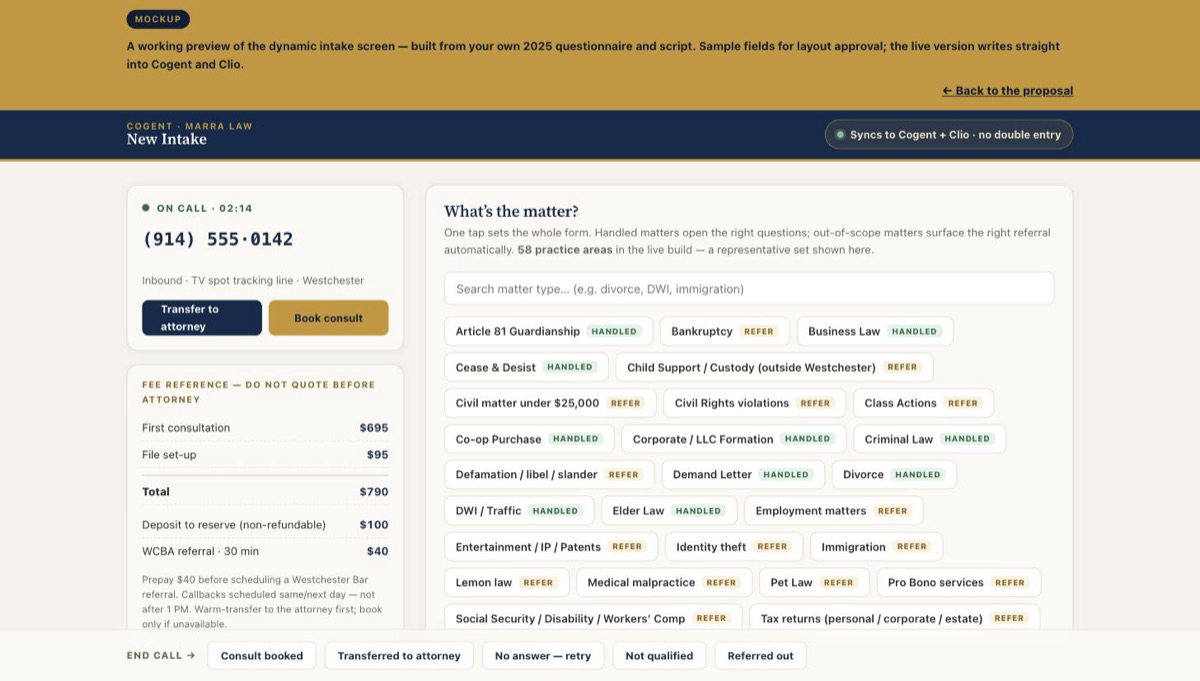 Interactive mockup
The dynamic intake screen
One tap sets the whole form — built from your own 2025 questionnaire and script. Click through it live.
Open the intake preview →
Interactive mockup
The dynamic intake screen
One tap sets the whole form — built from your own 2025 questionnaire and script. Click through it live.
Open the intake preview →
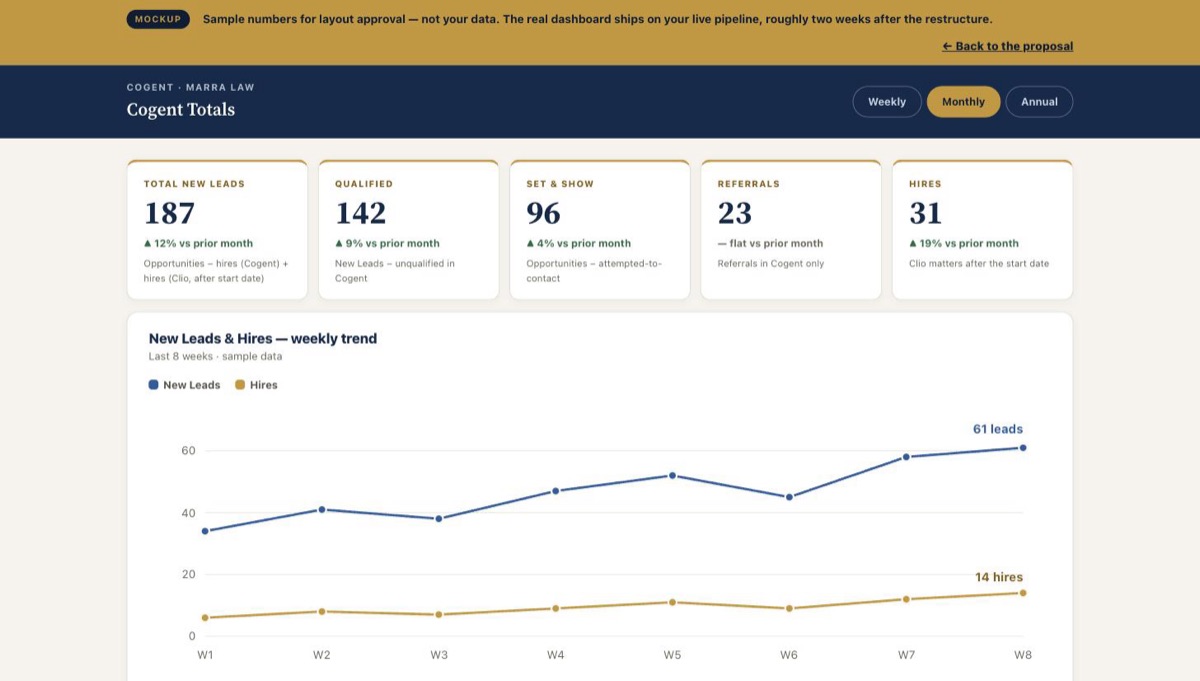 Interactive mockup
The reporting dashboard
Your five Cogent Totals in the PCLC format — number and graph side by side, Weekly / Monthly / Annual.
Open the reporting preview →
Interactive mockup
The reporting dashboard
Your five Cogent Totals in the PCLC format — number and graph side by side, Weekly / Monthly / Annual.
Open the reporting preview →
When a lead moves to Hired, Cogent opens a new matter in Clio — not just a contact — and every note taken on that lead transfers with it, automatically. Intake stops re-keying, and nothing typed during sign-up gets left behind.
Also unblocks: the Hires and New Leads numbers on your dashboard, which are defined against Clio matters.
Rebuilt in the PCLC layout you referenced. Weekly, monthly, and annual views. Every metric shown two ways — the plain number, easy to read, and the graph next to it. Includes the leads-by-source report, down to individual tracking numbers.
Ships after the restructure — so the numbers it shows are true on day one.
Text, call, email — for every lead who contacted the firm and didn’t retain. Written the way Joe specified: personal, and always asking a question. “Are you still considering moving forward with us?” — never “just following up.” Separate versions for PI and estate planning.
Includes copywriting for both practice areas and the required opt-out handling.
When a task is assigned in Cogent, a notification lands in your Microsoft Teams channel. Nobody has to be told twice, and nobody finds out three days later.
Needs one thing from your side: whoever administers Teams approves the connection.
The Clio integration and the reporting dashboard are one job, so they are one price. $1,500 one-time builds them. $99 a month after go-live carries the API connection, the scheduled sync, and the dashboard itself, and cancels on 30 days notice. The drip and the Teams alerts are quoted separately, only if you want them. Nothing bills without your written approval, and work starts when the invoice clears.
04 — Your Numbers
Your document defined five metrics. We build to your definitions — written here so we lock them and nobody ever argues about what a number means again.
| Metric | Your definition | Data it needs |
|---|---|---|
| Total New Leads | Total opportunities − new hires in Cogent + new hires in Clio after the start date | Cogent + Clio matters |
| Qualified | Total New Leads − unqualified in Cogent | Cogent |
| Set & Show | Total opportunities − attempted-to-contact in Cogent | Cogent |
| Referrals | Referrals in Cogent only | Cogent |
| Hires | Matters in Clio, counted after the start date | Clio matters |
05 — Timeline & Deadline
Sofia asked for a deadline. This is it, in writing — with the one honest condition attached. Day 0 is not the meeting. Day 0 is the day we hold all five inputs from section 06 and the week-one workflow session is on the calendar with your staff in the room. From that day, thirty days.
Weeks from Day 0 — all five inputs received
Day 0 — inputs in hand, work starts Week 2 — included work live Week 4+ — full program live, team trained
Gold bars are the included work. Blue bars are the custom builds — they start once the foundation they depend on is in place, which is why the dashboard never ships before the restructure.
06 — What We Need From You
The official date your Cogent Totals count from. Every metric on this page is defined against it.
The table in section 04 — confirm each formula as written, or correct it. Then it is locked.
Every lead source you want in the dropdown, and which tracking number belongs to which ad.
Administrator authorization on your Clio account so the integration can open matters and write notes.
The one person who owns tag creation, and whoever administers Microsoft Teams for the connection approval.
Everything else on this page is on us. We reviewed the current setup before writing this — walkthroughs of your stage list and workflow happen in week one.
07 — The Operating Rules
Here is the honest split. Everything software can enforce, we enforce — permissions, automations, locked dropdowns. But a CRM only knows what happens inside it. The current numbers aren’t wrong because Cogent miscounted — they’re wrong because the system is being fed by habit instead of by rules.
Twenty-one requests — and not one of the three things every request depends on. This is not a criticism. It is the diagnosis, and it is why the meeting matters more than the software.
Nowhere is it written what “Qualified” or “Attempted to Contact” actually means, or what has to happen before a lead moves. Every automation you asked for fires on stages nobody has defined.
“Make the automations work according to our workflow” — but the workflow exists only in your team’s heads, and each head has a different version. We cannot automate a process no one has written down.
Nobody at the firm owns when a lead moves, who marks unqualified, or what a tag means. That vacancy — not the software — is where the personal tags and the typed-in sources came from.
Cogent cannot enforce rules that don’t exist. Week one, we write them together — then the system holds people to them.
A lead’s stage reflects reality by end of day, every day. Automations fire on stages — the “follow-up text after they already talked to the attorney” misfire happens when the conversation happened but the stage didn’t move.
Without it: every automation you asked for misfiresIn Cogent, at signing, no exceptions. The reason your hires are counted out of Clio today is that hires weren’t reliably marked in Cogent. The integration will backstop this — but the number is only trustworthy if the team does it too.
Without it: your hires number stays a guessThe dropdown makes it one click. That click is the entire source report — skip it on intake and the leads-by-source dashboard you asked for reports fiction.
Without it: the source report is fictionYour Qualified number is defined as leads minus unqualified. A dead lead that nobody marks unqualified inflates Qualified forever. Disposition every lead — even the dead ones. Especially the dead ones.
Without it: “Qualified” inflates foreverNotifications become instant with this upgrade — the reason to work outside the app goes away. Replies sent from personal email or phones are invisible to the system, and invisible activity is why the dashboard undercounts your effort today.
Without it: the dashboard undercounts your own workWe lock tag creation to the person you name — software enforces this one. The owner’s job is to keep the list short and say no. A tag list that grows is a tag list dying again.
Without it: the tag mess rebuilds itself in 90 days08 — Straight Answers
You will get straight answers from us on every item, including these three — where the honest answer beats the easy yes.
What we deliver: an unread-count badge, instant desktop and mobile notifications the moment a lead messages, and timed reminder alerts. What no CRM delivers reliably: a window that forces itself over whatever you are working in. The badge-plus-instant-alert combination solves the real problem — hours-late email digests — and that is what we are committing to.
Joe is right — 5 to 9 PM is when people answer. Federal calling rules allow contact until 9 PM in the lead’s time zone, so evening blocks are in. Weekend calling is limited to the windows regulations permit, and we set the schedule to stay inside them. The drip texts carry the required opt-out language automatically — that is what keeps your number out of the spam bucket.
Outbound calls showing your tracking number as caller ID depends on carrier verification of that number — done wrong, carriers flag it as spam and you get the opposite of what Joe wants. We run the verification first. If the number passes, follow-ups go out on it. If it cannot pass, we bring you the alternative that keeps the caller ID recognizable — before building anything.
Because your team already diagnosed it: structure first. Every hour spent on a dashboard before the stages are fixed is an hour spent charting bad data. We lock the definitions, you approve the builds, and the first fix ships the same week.
Approve the builds, lock the start date, hand over the five inputs — and Day 0 is that day.
Where this comes from
This proposal responds to “Cogent Upgrades Needed” (August 12, 2026), sent by Sofia on August 17 following Joe’s conversation with Robert. Every request in that document appears on this page — as included work, as a priced build, or as a straight answer about what is honestly deliverable.
Questions: (888) 446-4490.